Save a phrase file
To save a phrase file to a new destination:
- Open the main program window.
- Highlight the desired phrase file in the root level of the phrase tree.
- Click File » Save As and choose the desired new storage location:
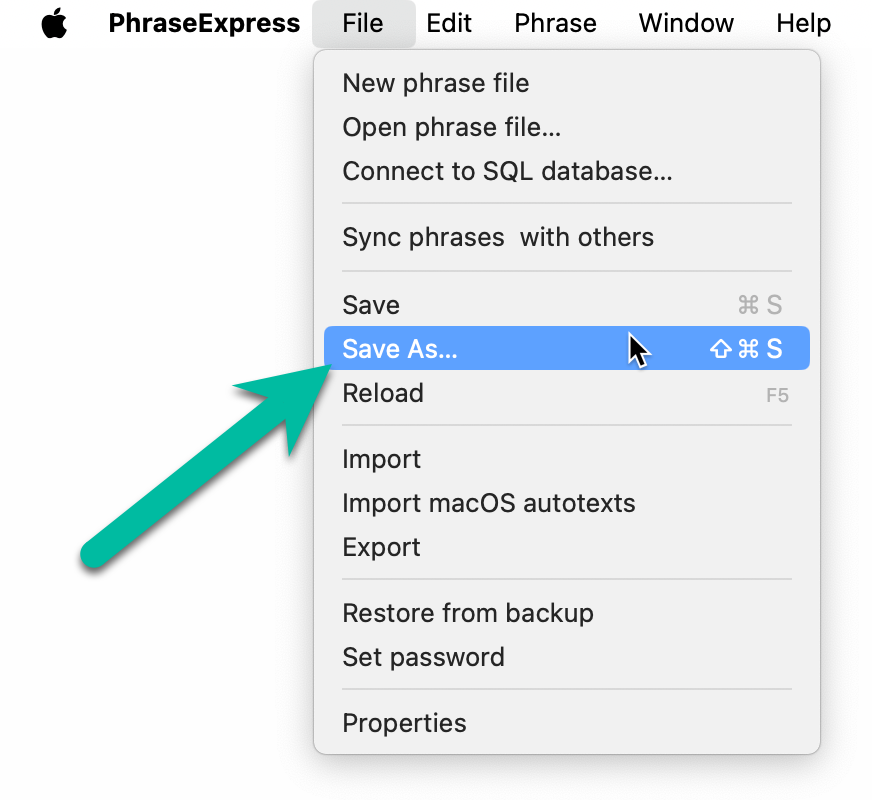
The phrase file will be saved to the new location and will be used from this new location.
Save the phrase file on the local hard drive of your Mac instead a network share or cloud sync directory, e.g. iCloud.
Using a network share bear the risk of network interruptions, e.g. if the Mac enters hibernation/sleep mode. Also, a network share may not be available when PhraseExpress is already trying to load phrase file on Mac startup.
To share phrases with other users, rather use the synchronization feature. If you considered the network share for backup reasons, rather configure the backup storage location in PhraseExpress settings.
Table of Contents
- Installation
- Getting started
- User interface
- Create phrases
- Insert phrases
- Edit phrases
- Manage phrases
- Macro functions
- Extra features
- Sharing phrases
- Working with phrase files
- Import external data
- Licensing
- Settings
- Reference
Table of Contents
- Installation
- Getting started
- User interface
- Create phrases
- Insert phrases
- Edit phrases
- Manage phrases
- Macro functions
- Extra features
- Sharing phrases
- Working with phrase files
- Import external data
- Licensing
- Settings
- Reference