How may we assist you today?
First Aid
PhraseExpress prompts for a password
If PhraseExpress prompts for a password and if you are 100% sure, that you never applied a password protection, either someone else entered a password or the phrase file may be corrupt.
In most cases, this can happen, if the computer has been reset, switched off or crashed while PhraseExpress was still busy writing the file.
Don't panic! PhraseExpress creates backups and you can easily restore previous versions of your phrase file.
To avoid this situation in the future:
- Make sure, that PhraseExpress can finish writing all files when the program is shut-down.
- Never switch off the computer while it is powering down.
How to disable "suppressed autotext" notifications?
Autotext replacements are suppressed if you press a specific hotkey directly after typing an autotext.
For example, the autotext "FBI" wouldn't be expanded to "Federal Bureau of Investigation" if you press the autotext suppression hotkey directly after entering the autotext. This gives you a case-by-case choice to have the autotext being executed as needed.
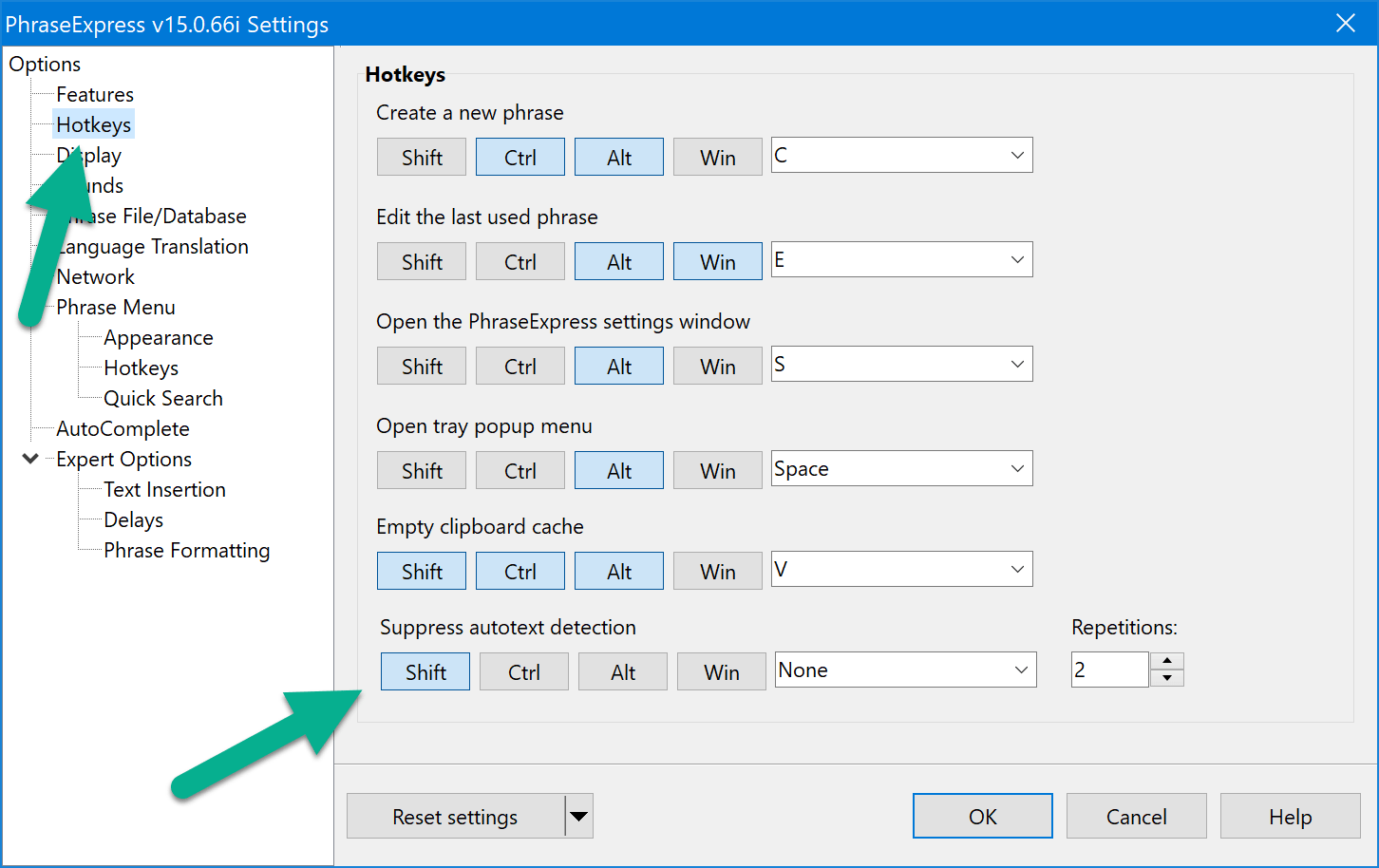
The (customizable) default hotkey is pressing 2x SHIFT. Unfortunately, it seems to be easily entered by accident.
Solution: Open PhraseExpress settings, switch to section "hotkeys" and select another hotkey or delete the hotkey association if you don't need this feature:
WYSIWYG form controls are too tiny
Phrases with WYSIWYG form controls contain the display resolution information (DPI) which may be incompatible for modern high-resolution displays.
Solution: You would need to re-create the WYSIWYG form elements to have them auto-adapt with your actual display resolution.
Certain characters or accent marks cannot be entered anymore
Accented characters are letters that are entered by sequentially pressing multiple keys on your keyboard, such as á, é, í, ó, ú, ü, ñ, ¿, ¡
If setting the OS to a specific language, make sure that the keyboard settings matches the input language. For example, if the language is set to Dutch, then configure the keyboard setting to "United States-International keyboard for Dutch".
If using PhraseExpress along with other applications with keyboard input detection (called "keyboard hooks"), such as AutoHotkey, Intellitype, etc, accented characters cannot be processed correctly because of interference of those programs.
Solution: Do not run multiple such programs simultaneously.
The Clipboard Manager does not show up
Possible causes:
- Clipboard memory has been deactivated. Solution: Activate the clipboard memory.
- The Clipboard Manager is restricted to specific programs. Solution: Adjust the program restriction settings
- The shortcut key assignment has been removed/deleted/changed. Solution: Assign the desired key combination to the clipboard memory:
- The clipboard is empty. Then it is not displayed. Solution: Fill the clipboard with text.
- Another application is using the key combination for other purposes. Solution: Resolve the conflict.