How may we assist you today?
First Aid
Make Webroot and PhraseExpress work together
Webroot Secure Anywhere can prevent PhraseExpress from detecting abbreviations in browsers like Chrome or Firefox and other applications, like Microsoft Word.
This will cause PhraseExpress not to expand autotext abbreviations or to show the phrase menu.
To configure Webroot SecureAnywhere for use with with PhraseExpress:
- Open Secure Anywhere Setting, by right-clicking its tray icon and choosing "View Status".
- Click the cog wheel icon near "Identity Protection".
- Disable "the Identity Shield".
After following above steps, PhraseExpress shall detect your autotext input reliably.
Make Zemana Antilogger and PhraseExpress work together
Zemana Antilogger is an anti-keylogger application, that prevents malicious software from capturing keyboard input to sneak passwords or sensitive data that you may type into your browser or other applications.
Unfortunately, in its default configuration, its keystroke encryption prevents PhraseExpress from detecting entered autotext abbreviations. Unfortunately, this occurs without Zemana reporting any blocked application.
To configure Zemana Antilogger for use with with PhraseExpress:
Click on the Settings button in the Zemana main window.
Change to tab Security Settings.
Uncheck Enable keystroke encryption.
After following above steps, PhraseExpress shall detect your autotext input reliably.
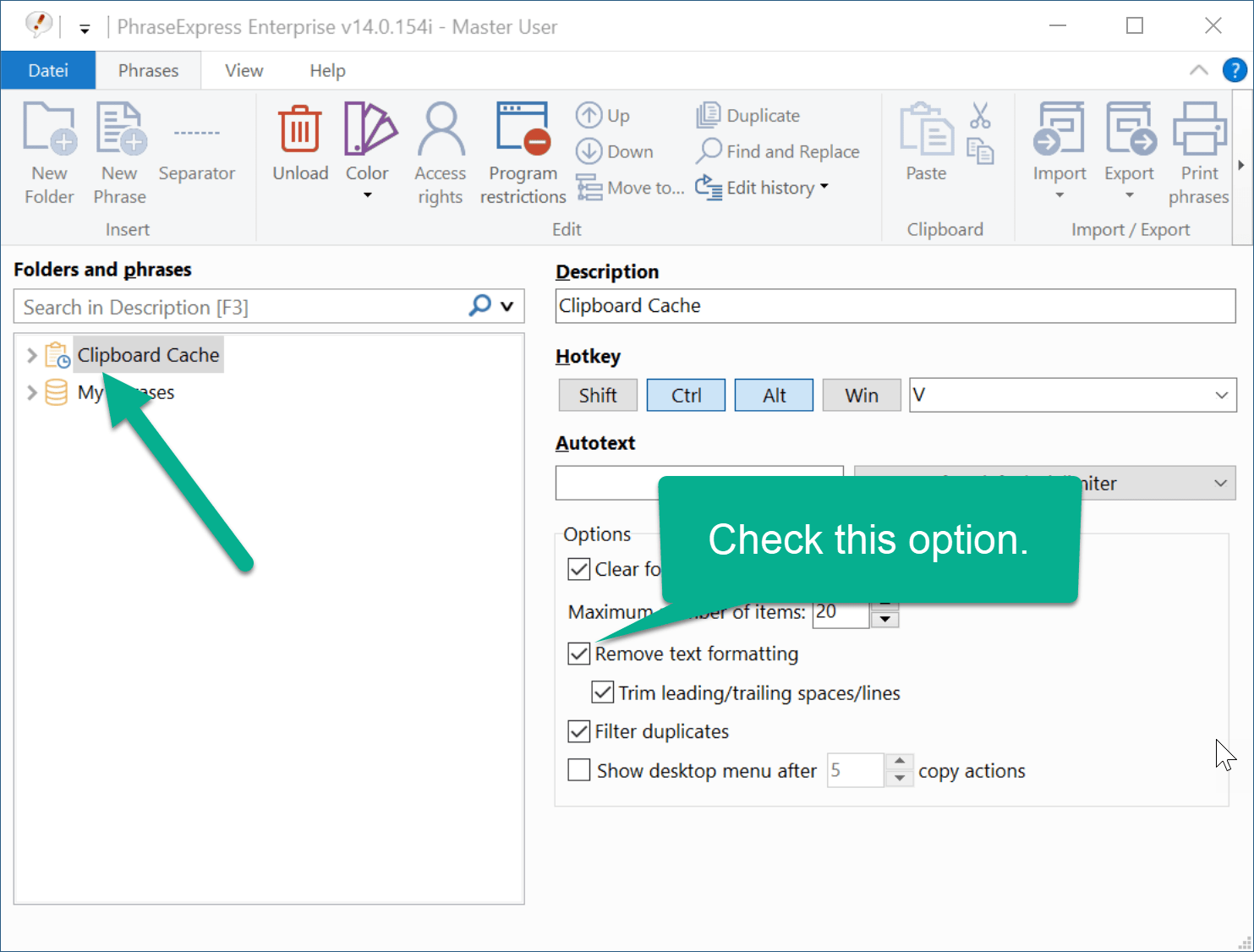
How to solve Excel error "Picture is too large and will be truncated"?
To resolve Microsoft Excel issuing the error message "Picture is too large and will be truncated" on clipboard operations, configure the PhraseExpress Clipboard Manager to "":
Solution for error "pexkey.dll too old"
If you receive the error "pexkey.dll too old" on program launch, a software update or a re-installation over an existing PhraseExpress installation seem to have gone wrong.
Solution:
- Uninstall PhraseExpress (No worries. Phrases won't be deleted and you can keep your settings).
- Reboot computer. Don't miss this step.
- Reinstall PhraseExpress
Where is the global Variable Manager?
The Variable Manager introduced in PhraseExpress v14 has been removed in PhraseExpress v15 to provide more functionality.
When the phrase file is loaded for the first time, PhraseExpress v15 converts your global variables into regular phrases, which are stored in a new phrase folder "Variables".
You can then drag these phrases into any phrase for use as before.
Benefits:
- Previously, any user could modify or even delete the global variables without access rights restrictions. The earlier variables now stored as regular phrases can now be access restricted.
- Variables can now also be restricted to certain programs.
- The variables now stored as text blocks can be used with all other PhraseExpress functions (Search, Find and Replace, etc.)